

If you want more new-patient calls without leaning on discounts, the Google Map Pack is the fastest place to win. It shows up above the organic results for many “dentist near me” searches, and it pulls people who are ready to book.
This blog is built for real dental offices. It focuses on the changes that improve local visibility and the front-desk outcomes that matter: calls, direction requests, and booked appointments.
Quick note: Map Pack visibility is not a one-time setup. It is a weekly routine.
What the Google Map Pack is and how dentists get chosen
The Map Pack (also called the Google 3-Pack) is the box of three local listings that appears on Google for many local searches. It is where patients click when they are comparing options quickly, especially on mobile.

This is what patients see first: the Map Pack, then quick actions like Call and Directions.
Local results are shaped by three signals: relevance (are you a match), distance (how close you are), and prominence (how trusted and well-known you appear online). When you understand that framework, the steps below feel less like “SEO tips” and more like common sense.
If you want the deeper explanation behind those signals, start with how local SEO works, then come back and run the checklist.
Step 1: Claim and Tighten up your Google Business Profile
Dentist question: “Why do we show sometimes, then disappear?”
Many Map Pack problems start with one boring issue: Google cannot tell what your real business details are. If your Name, Address, or Phone differs across the web, Google sees uncertainty. Uncertainty lowers confidence, and confidence impacts visibility.
Action checklist
- Use one exact business name everywhere. Use your real name, not a keyword-stuffed variation.
- Use one primary phone number everywhere, ideally the same number on your website and Google profile.
- Standardize your address formatting everywhere, including Suite vs Ste and punctuation.
Real practice example: you moved suites last year and updated your website, but two big directories still show the old suite. Google reads that mismatch as noise.
Step 2: Select categories you want to rank for
Dentist question: “Why do we rank for ‘dentist’ but not ‘emergency dentist’?”
Categories are not decoration. They are a strong relevance signal inside your profile. Your Primary Category is the big lever. Secondary categories help, but they cannot fully fix a wrong primary category.
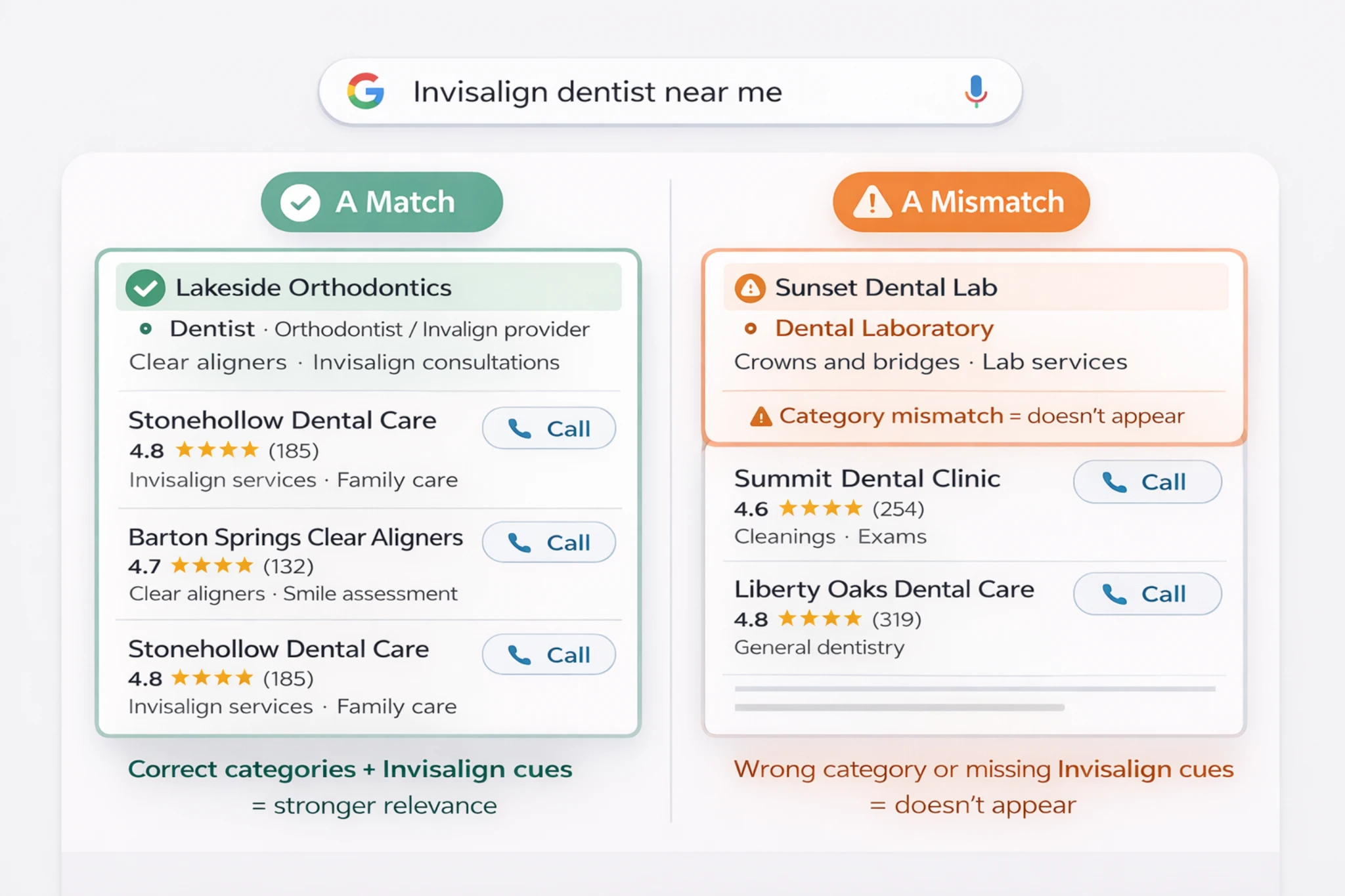
Same search, different category fit. Correct categories and Invisalign cues make you eligible to show.
For a dentist-specific explanation of what the primary category really controls, read why your primary category matters.
- Pick the category you “wish” you were instead of what matches your actual services.
- Add specialty categories that imply credentials you do not have.
- Set it once and never revisit it as your service mix changes.
- Choose a primary category that matches your core business (most general practices: “Dentist”).
- Add secondary categories based on services you actively provide and want to be found for.
- Review categories quarterly, especially after service expansion or staffing changes.
Step 3: Implement the “review velocity” rule
Dentist question: “We have a lot of reviews. Why isn’t that enough?”
A high review count helps prominence, but steady review activity often wins in competitive markets. Practices that collect reviews consistently look active and trusted right now.
A front desk review system that sticks
- At checkout, choose one moment worth asking for a review (pain relief, calm first visit, great hygiene visit, clear implant consult).
- Send the link the same day while the experience is fresh.
- Track weekly completion, not monthly totals.
- Respond twice a week so you do not fall behind.
Keep replies general and avoid confirming treatment details in a way that creates privacy issues.
If you want to pull more ranking relevance from what patients already say, use scan what patients mention in reviews and align your responses and on-site wording with real language patients use.
Myth check
Myth: “If we just get more 5-star reviews, we will rank.” Reality: Reviews help, but they cannot fix a relevance problem caused by wrong categories or inconsistent business details.
Step 4: Build hyper-local pages
Dentist question: “Do city pages help or hurt?”
Location pages can support local visibility when they are genuinely useful. They help match searches like “dentist [area]” and improve conversions when patients click from the Map Pack to your site.
The mistake is copying one page ten times and swapping the city name. Instead, build a small set of pages for the neighborhoods you truly serve, and include real context: landmarks, commute cues, and the services those patients actually ask for.
Quick quality checklist for a local page
- One neighborhood per page, with real specifics.
- Service focus that matches your categories and what you want to rank for.
- A short local FAQ (parking, appointment types, emergency flow, etc.).
Step 5: Keep your Google Business Profile active
Dentist question: “Do posts and photos actually matter?”
Google Business Profile is not Instagram, but activity signals help trust and patient confidence. Photos also answer the unspoken question patients have: “Is this place modern, clean, and welcoming?”
A realistic cadence is one photo and one short update per week. If you need a simple, HIPAA-aware approach, follow this guide on photo cadence on Google Business Profile.
Step 6: Claim your local citations
Dentist question: “Which directories matter and which are a waste?”
Citations are consistent mentions of your practice details across trusted sites. The goal is not to be listed everywhere. The goal is accuracy where Google and patients actually look.
| Citation check | What to verify | Common mistake |
|---|---|---|
| Practice name | Exact match everywhere | Adding keywords to the name on some listings |
| Address format | Same suite formatting everywhere | Ste vs Suite inconsistencies |
| Phone number | One primary number, consistent | Old tracking numbers left on directories |
One “prominence” move that helps beyond citations is earning local links from real organizations. If you want the dentist-safe approach to authority building, use local link building standards that prioritize real community signals over random links.
Step 7: Technical mobile-first check
Dentist question: “What if we rank but people do not book?”
Most Map Pack searches happen on a phone, often while someone is at work, in their car, or across town. That matters for two reasons. First, Google can show different 3-Pack results depending on where the searcher is standing. Second, mobile visitors are impatient, so even small friction can cost you the call.
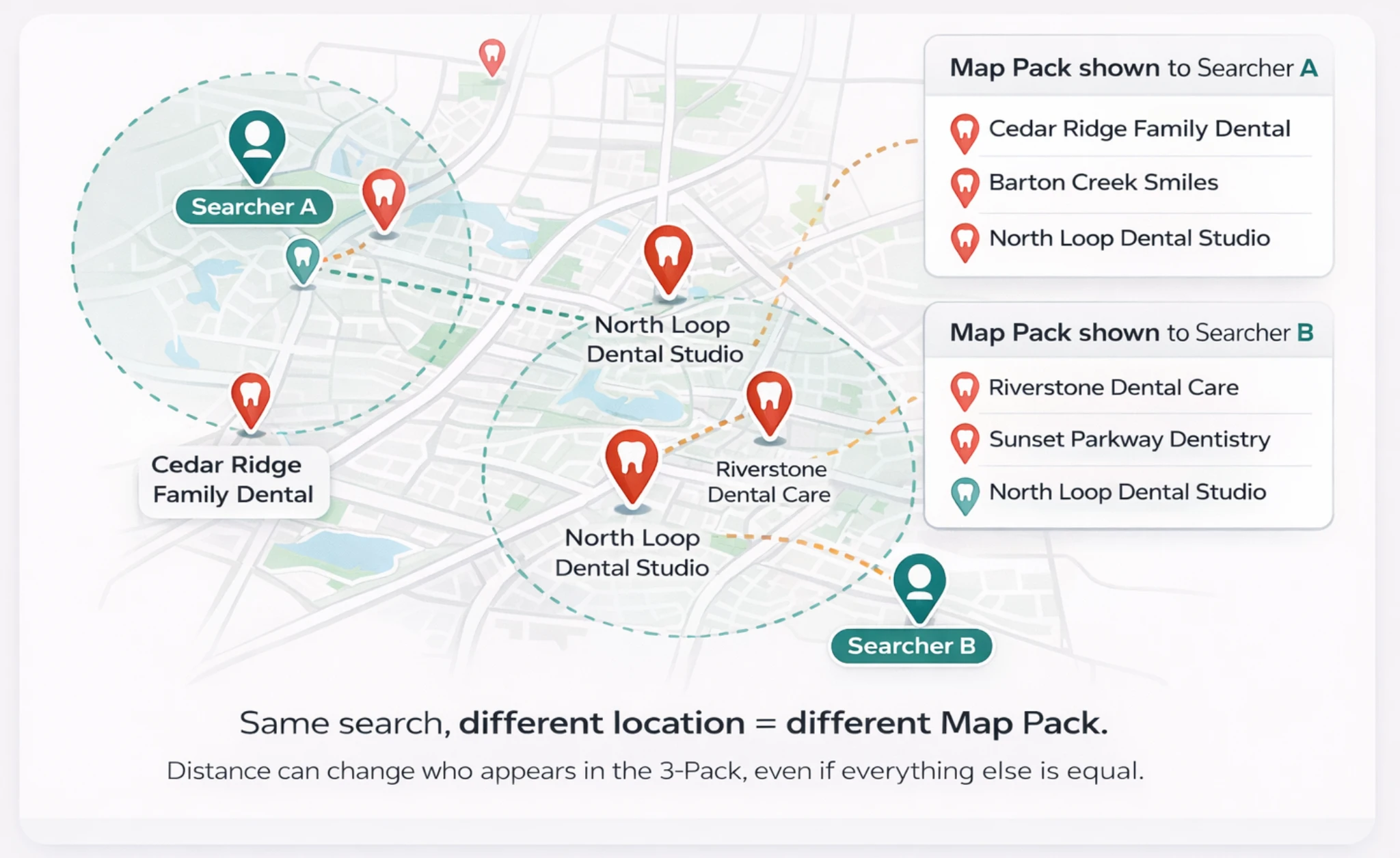
Same search, different location. Distance is why you cannot “rank everywhere,” even if your profile is strong.
So if your rankings feel inconsistent, do not assume something is broken. But if you do show up and your site is slow or your phone number is hard to find, you will still lose the lead to the next practice in the Map Pack.
3-minute mobile test
- Load your homepage and your emergency page on a phone.
- If it takes too long to feel usable, you are leaking calls.
- Make the phone number tap-to-call and visible immediately.
- Keep forms short and friction-free.
Real practice example: you hit the 3-Pack for “emergency dentist,” but the mobile page hides the phone number. Patients call the next listing instead.
A simple weekly Map Pack routine your team can follow
Map Pack wins come from consistency. If you want rankings to be stable, make it a routine that does not collapse when you get busy.
Weekly plan (15 minutes)
- Monday (5 minutes): Check calls, direction requests, and website clicks in GBP insights. Note sudden drops.
- Wednesday (5 minutes): Send review requests for last week’s completed appointments and track completions.
- Friday (5 minutes): Upload one new photo and post one short update.
Monthly (30 minutes): citation accuracy check, duplicates, category review, and Q&A monitoring.
Bottom line
Ranking in the Google Map Pack for dentists is not about tricks. It is about proving you are the most relevant, most consistent, and most trusted option for patients searching in your area.
If you want to contribute a real-world local SEO win from your market, share your perspective through Write for Us.
Want a custom audit? Email: Info@thesmileinsider.com
