

You can be the closest dental clinic and still not be the first practice a patient sees
I tested a real “dentist near me” search in Windsor and captured what Google actually showed. The result was not as clean as most dental owners would expect.
A sponsored clinic more than 40 kilometres away appeared above much closer Windsor options. That does not mean proximity stopped mattering. It shows how ads, local results, relevance, categories, and search intent can all compete for the same screen.
The search looked simple. The result was not.
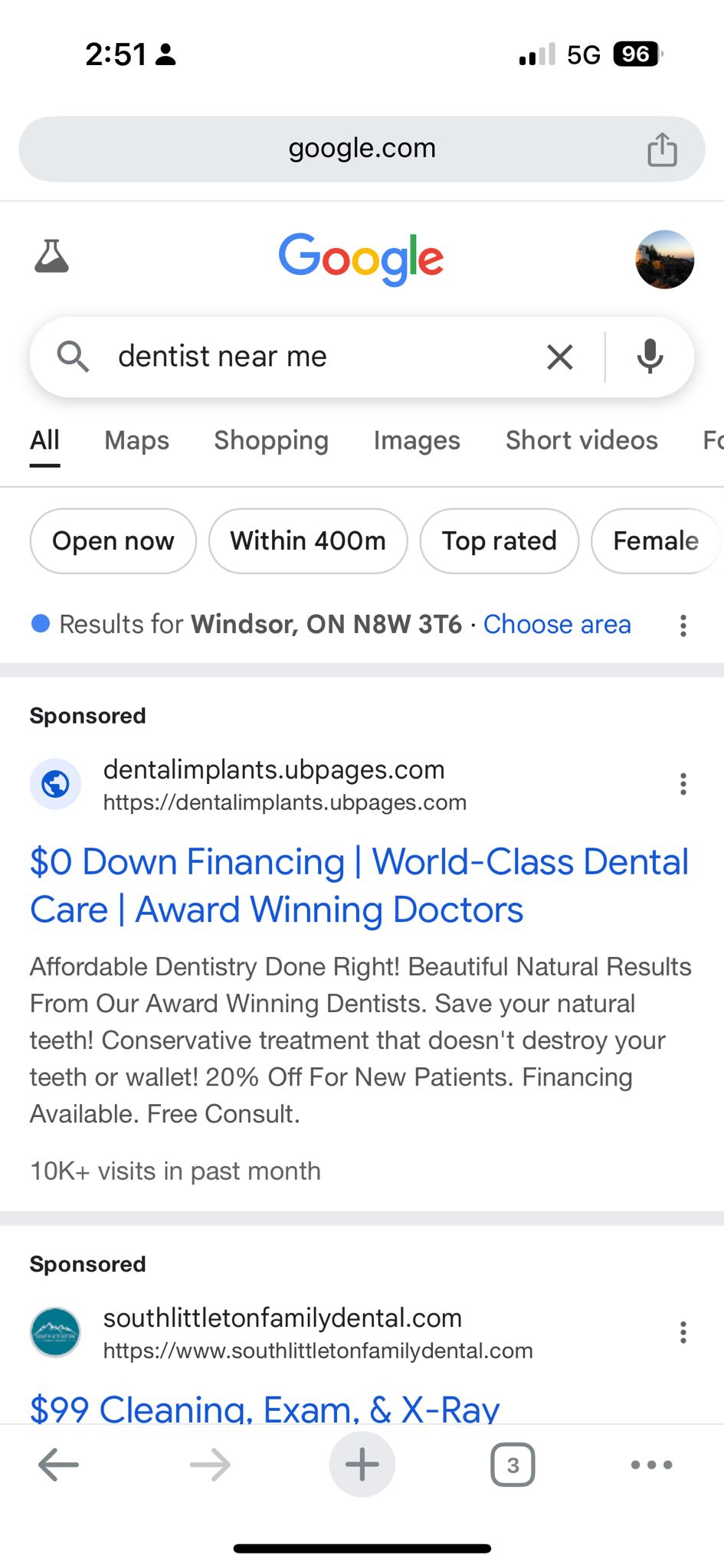
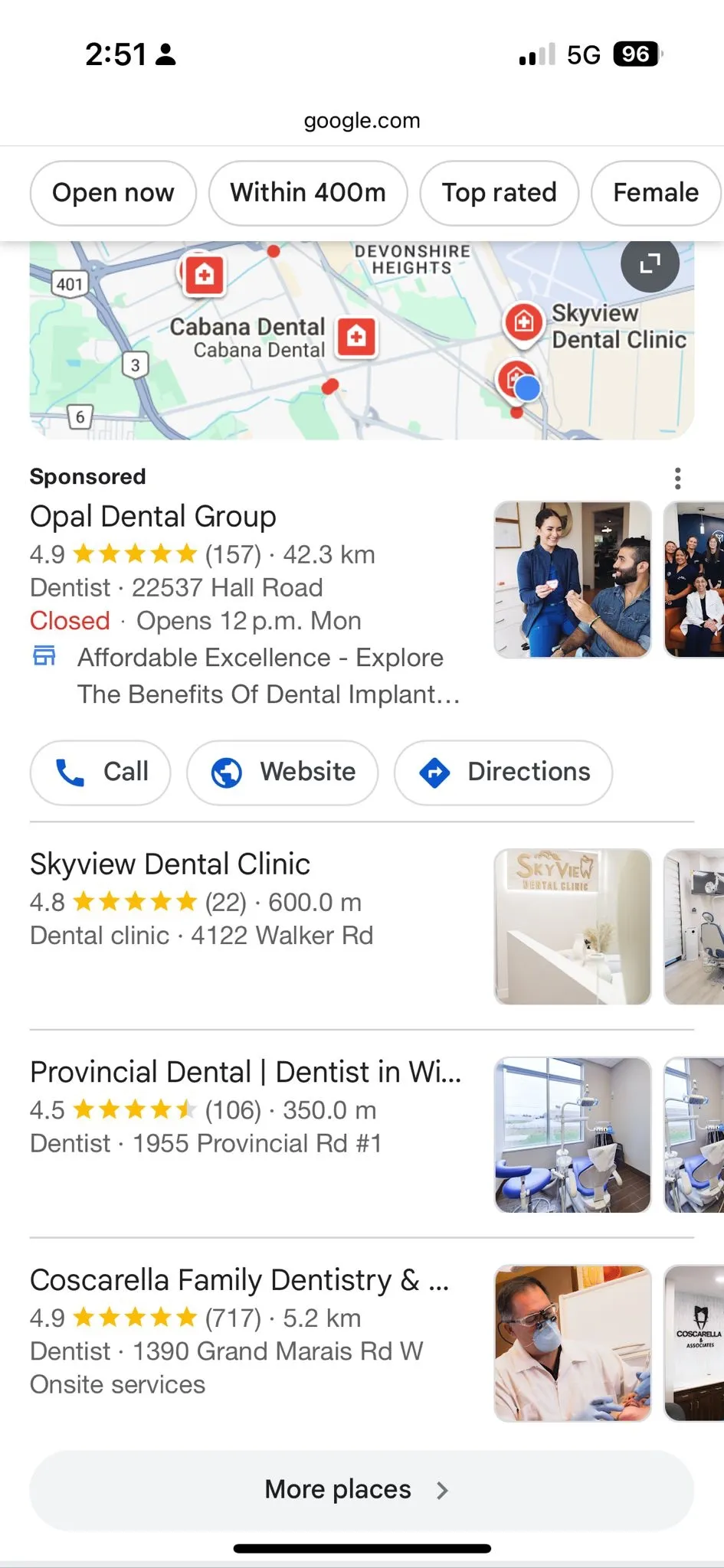
Watch what happened in the actual search
I recorded this short to show the result exactly as a patient might experience it. That is more useful than discussing local search only from theory.
“Near me” is not a simple distance contest
A patient may assume the nearest clinic will automatically appear first. In reality, the screen can contain ads, Maps results, organic results, directories, and other result types at the same time.
Google is also trying to understand what the searcher means, which businesses match that need, and how confident it is in those matches.
That is why local search is less predictable than simply saying, “We are closer, therefore we should rank first.”
Why broad dental searches can become messy
“Dentist near me” gives Google less information than a search such as “emergency dentist open now” or “Invisalign dentist Windsor.”
With a broad search, Google has to infer more. The searcher could want general dentistry, urgent care, a family dentist, a new clinic, weekend hours, or simply the nearest available option.
That is why one generic page should not be expected to answer every dental search equally well.
Check what patients actually see around your clinic
- Stand near your clinic or in a neighbourhood you genuinely serve.
- Turn location services on.
- Open a private/incognito browser.
- Search “dentist near me.”
- Search one important treatment plus Windsor.
- Write down which clinics repeatedly appear.
- Separate sponsored results from Maps and organic results before drawing conclusions.
Check whether your Google Business Profile matches the services you want to be found for
A practice owner or office manager should know what Google currently understands about the business.
- Sign in to the Google account that manages the practice.
- Search the exact clinic name in Google.
- Open the Business Profile controls that appear in Search.
- Choose Edit profile.
- Review the primary business category.
- Review any additional categories.
- Check hours, phone number, address, website URL, services, and booking links.
- Make sure the categories and services reflect what the clinic actually provides.
If Maps and Google Business Profile visibility are the main issue, see our local SEO for Windsor dentists .
More specific searches reduce some of the ambiguity
A patient searching for urgent care behaves differently from someone comparing Invisalign, looking for sedation, or checking CDCP participation.
| Search type | Likely patient need | Best page response |
|---|---|---|
| Broad local | Find a nearby dental clinic | Strong clinic/location page with clear local information |
| Emergency | Get help quickly | Emergency page with availability and obvious contact path |
| Invisalign | Compare treatment or providers | Treatment page focused on consultation intent |
| Sedation | Reduce fear or anxiety | Trust-first treatment page |
| CDCP | Understand coverage and clinic participation | Accurate coverage information and next steps |
Emergency searches should not behave like general dental content
Someone in pain is not comparing dentistry in the same way as a routine patient. They want to know whether the clinic can help, whether it is open, where it is, and how quickly they can contact someone.
That is why Windsor emergency dentist searches deserve a much clearer next step than a generic services page.
Invisalign searches tell you more about what the patient wants
A person searching specifically for Invisalign in Windsor has already narrowed the problem.
That page can focus on consultation questions, treatment expectations, provider experience, and the next step instead of trying to explain every service the clinic offers.
Sedation searches are often really trust searches
Someone researching sedation dentistry in Windsor may be nervous, delaying care, or trying to understand how treatment will feel.
Generic dental copy does not answer that concern well. The page needs to reduce uncertainty before the patient is likely to book.
CDCP searches often begin with “Can I use my coverage here?”
Some patients start with coverage rather than treatment. That makes the Windsor CDCP search a different intent from a general dentist query.
The page should make participation and next steps clear without implying that every treatment is automatically free.
Check whether Google has one clear page for each important patient need
- Write down your five most important treatment searches.
- Search Google using site:yourdomain.com plus each treatment.
- Look for several pages covering essentially the same topic.
- Choose the strongest page as the main owner.
- Update or consolidate overlapping pages where appropriate.
- Link supporting pages clearly back to the main service page.
Use call quality to tell whether search intent is actually right
Search Console can tell you what people searched. Your front desk can tell you whether those searches produced the right kind of patient.
- What the patient searched for or asked about
- Whether they were new or existing
- Which treatment they wanted
- Whether they booked
- Whether the clinic could actually serve the request
If a page receives traffic but repeatedly attracts the wrong calls, the issue may be intent mismatch rather than lack of visibility.
See how Windsor patient searches split into different demand lanes
The TSI Live Dashboard is useful here because it organizes Windsor dental demand around actual patient needs rather than treating every local dental search as one giant keyword.
It can help owners see the difference between urgent, treatment, coverage, comfort, and broader local-search intent before deciding which pages or campaigns deserve attention.
- Explore high-intent Windsor dental searches
- See how different patient needs should map to different pages
- Find opportunities where your clinic may need stronger visibility
- Compare whether your current website structure matches real search intent
Windsor keyword ambiguity FAQs
What is keyword ambiguity in local dental search?
It happens when a search phrase leaves Google with several plausible interpretations. Broad phrases such as “dentist near me” can trigger a mixture of ads, Maps results, clinics, and other local results.
Why did a clinic more than 40 km away appear above nearby Windsor clinics?
In the screenshot on this page, the distant result was sponsored. Paid placement and local organic ranking are different systems, so the sponsored result should not be interpreted as Google deciding that the distant clinic was the nearest local option.
Should one page target emergency, Invisalign, sedation, and CDCP searches?
Usually not. Those searches represent different patient needs and different next steps. Separate pages can make sense when each page provides genuinely distinct information rather than repeating the same local copy.
What should a Windsor dental owner check first?
Start with what appears in Google around the clinic, then review your Google Business Profile, priority treatment pages, page overlap, internal links, and the quality of calls those pages generate.
See what Windsor patients are actually searching for
Use the Live Dashboard to explore Windsor dental search intent, or talk to us if you want help deciding which pages and local signals need attention first.
Explore Live Dashboard View Windsor SEO Services